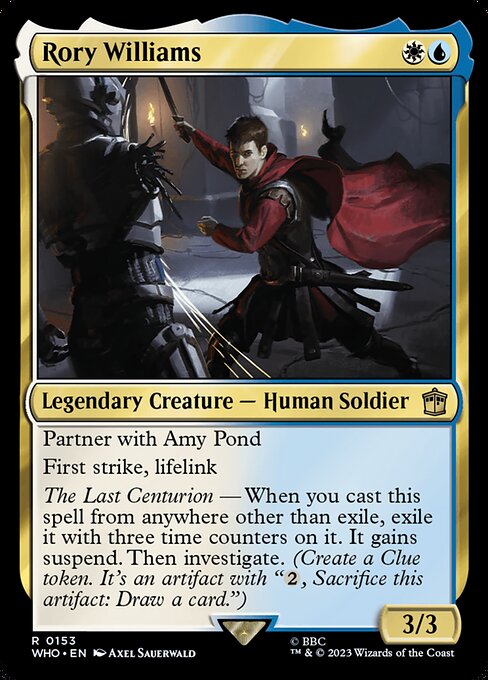
Legendary Creature — Human Soldier
PartnerPartner abilities are keyword abilities that modify the rules for deck construction in the Commander variant (see rule 903), and they function before the game begins. Each partner ability allows you to designate two legendary cards as your commander rather than one. Each partner ability has its own requirements for those two commanders. The partner abilities are: partner, partner—[text], partner with [name], choose a Background, and Doctor’s companion.
Your deck must contain exactly 100 cards, including its two commanders. Both commanders begin the game in the command zone.
A rule or effect that refers to your commander’s color identity refers to the combined color identities of your two commanders. See rule 903.4.
Except for determining the color identity of your commander, the two commanders function independently. When casting a commander with partner, ignore how many times your other commander has been cast (see rule 903.8). When determining whether a player has been dealt 21 or more combat damage by the same commander, consider damage from each of your two commanders separately (see rule 903.10a).
If an effect refers to your commander while you have two commanders, it refers to either one. If an effect causes you to perform an action on your commander and it could affect both, you choose which it refers to at the time the effect is applied.
Different partner abilities are distinct from one another and cannot be combined. For example, you cannot designate two cards as your commander if one of them has “partner” and the other has “partner with [name].”
If a legendary card has more than one partner ability, you may choose which one to use when designating your commander, but you can’t use both. Notably, no partner ability or combination of partner abilities can ever let a player have more than two commanders.
“Partner” means “You may designate two legendary cards as your commander rather than one if each of them has partner.”
“Partner—[text]” means “You may designate two legendary cards as your commander rather than one if each of them has the same ‘partner—[text]’ ability.” The “partner—[text]” abilities are “partner—Character select,” “partner—Father & son,” “partner—Friends forever,” and “partner—Survivors.”
“Partner with [name]” represents two abilities. It means “You may designate two legendary cards as your commander rather than one if each has a ‘partner with [name]’ ability with the other’s name” and “When this permanent enters, target player may search their library for a card named [name], reveal it, put it into their hand, then shuffle.”
“Choose a Background” means “You may designate two cards as your commander rather than one if one of them is this card and the other is a legendary Background enchantment card.” You can’t designate two cards as your commander if one has a “choose a Background” ability and the other is not a legendary Background enchantment card, and legendary Background enchantment cards can’t be your commander unless you have also designated a commander with “choose a Background.”
“Doctor’s companion” means “You may designate two legendary creature cards as your commander rather than one if one of them is this card and the other is a legendary Time Lord Doctor creature card that has no other creature types.”
If an effect refers to a partner ability by name, it means only that partner ability and not any others. If an effect refers to the partner ability or cards with partner and doesn’t mention a specific variant of the partner ability by name, it is referring only to partner, partner—[text], partner with [name], or cards with any of those abilities, and it does not refer to any other partner variant. (CR 702.124) with Amy Pond
First strikeFirst strike is a static ability that modifies the rules for the combat damage step. (See rule 510, “Combat Damage Step.”)
If at least one attacking or blocking creature has first strike or double strike (see rule 702.4) as the combat damage step begins, the only creatures that assign combat damage in that step are those with first strike or double strike. After that step, instead of proceeding to the end of combat step, the phase gets a second combat damage step. The only creatures that assign combat damage in that step are the remaining attackers and blockers that had neither first strike nor double strike as the first combat damage step began, as well as the remaining attackers and blockers that currently have double strike. After that step, the phase proceeds to the end of combat step.
Giving first strike to a creature without it after combat damage has already been dealt in the first combat damage step won’t preclude that creature from assigning combat damage in the second combat damage step. Removing first strike from a creature after it has already dealt combat damage in the first combat damage step won’t allow it to also assign combat damage in the second combat damage step (unless the creature has double strike).
Multiple instances of first strike on the same creature are redundant. (CR 702.7), lifelinkLifelink is a static ability.
Damage dealt by a source with lifelink causes that source’s controller, or its owner if it has no controller, to gain that much life (in addition to any other results that damage causes). See rule 120.3.
If an object is no longer in the zone it’s expected to be in as an effect causes it to deal damage, its last known information is used to determine whether it had lifelink.
The lifelink rules function no matter what zone an object with lifelink deals damage from.
If multiple sources with lifelink deal damage at the same time, they cause separate life gain events (see rules 119.9–10).
Multiple instances of lifelink on the same object are redundant. (CR 702.15)
The Last Centurion — When you castTo cast a spell is to take it from the zone it’s in (usually the hand), put it on the stack, and pay its costs, so that it will eventually resolve and have its effect. A player may cast a spell if they have priority. See rule 601, “Casting Spells.”
To cast a card is to cast it as a spell. (CR 701.5) this spell from anywhere other than exileTo exile an object, move it to the exile zone from wherever it is. See rule 406, “Exile.” (CR 701.13), exileTo exile an object, move it to the exile zone from wherever it is. See rule 406, “Exile.” (CR 701.13) it with three time countersTo counter a spell or ability is to cancel it: remove it from the stack without resolving it. A counter on an object or player is instead a marker that changes characteristics or interacts with rules or abilities; for example, a +1/+1 counter modifies a creature’s power and toughness. (CR 701.6; 122.1) on it. It gains suspendSuspend is a keyword that represents three abilities. The first is a static ability that functions while the card with suspend is in a player’s hand. The second and third are triggered abilities that function in the exile zone. “Suspend N—[cost]” means “If you could begin to cast this card by putting it onto the stack from your hand, you may pay [cost] and exile it with N time counters on it. This action doesn’t use the stack,” and “At the beginning of your upkeep, if this card is suspended, remove a time counter from it,” and “When the last time counter is removed from this card, if it’s exiled, you may play it without paying its mana cost if able. If you don’t, it remains exiled. If you cast a creature spell this way, it gains haste until you lose control of the spell or the permanent it becomes.”
A card is “suspended” if it’s in the exile zone, has suspend, and has a time counter on it.
While determining if you could begin to cast a card with suspend, take into consideration any effects that would prohibit that card from being cast.
Casting a spell as an effect of its suspend ability follows the rules for paying alternative costs in rules 601.2b and 601.2f–h. (CR 702.62). Then investigate“Investigate” means “Create a Clue token.” See rule 111.10f. (CR 701.16). (CreateTo create one or more tokens with certain characteristics, put the specified number of tokens with the specified characteristics onto the battlefield.
If a replacement effect applies to a token being created, that effect applies before considering any continuous effects that will modify the characteristics of that token. If a replacement effect applies to a token entering the battlefield, that effect applies after considering any continuous effects that will modify the characteristics of that token.
Previously, an effect that created tokens instructed a player to “put [those tokens] onto the battlefield.” Cards that were printed with that text have received errata in the Oracle card reference so they now “create” those tokens. (CR 701.7) a Clue tokenA colorless artifact token: , sacrifice it to draw a card. (CR 111.10). It's an artifact with ", SacrificeTo sacrifice a permanent, its controller moves it from the battlefield directly to its owner’s graveyard. A player can’t sacrifice something that isn’t a permanent, or something that’s a permanent they don’t control. Sacrificing a permanent doesn’t destroy it, so regeneration or other effects that replace destruction can’t affect this action. (CR 701.21) this token: Draw a card.")
$0.32
Commander: LegalModern: Not legal
Save this card
Log in to save cards to your lists.
Start a deck with this cardTags and classifications
Card attributes are distinct from extracted ability facts and inferred themes. AI themes and predicted tags are suggestions, not rules text.
Ability tags
Mana costs
Creature kinds
Classes and roles
Color identity
Keyword tags
Mana value
Theme tags
Timing tags
Type tags
Predicted tags are currently unavailable.